
|
|
ShowTheBest.ComInteractive tables on your web pages |
The Interactive Table Web Page consists of three components. The
header is HTML that comes before the interactive table; the
footer is HTML that comes after your interactive table. The DDB
represents the original static table, written between HTML
<table...> and </table> tags.
You can specify your own DDB, header and footer by creating headerfile.txt and footerfile.txt in the Interactive Table Directory. You need to use an editor to create these files. You can also specify a DDB, header and footer that depends on your user's browser type.
ShowTheBest currently recognizes three browser types: Netscape Navigator, Internet Explorer, and everything else. It also recognizes "single precision" versions of Netscape Navigator and Internet Explorer (i.e., version 5.01 and 5.02 are both recognized as version 5.0).
ShowTheBest.Com generates a Browser Suffix Code (BSC) that appears as an HTML comment on the Interactive Table Web Page. It uses the BSC to determine if the user's browser supports styles adequately. The BSC specification is:
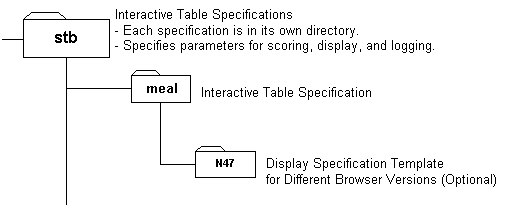
ShowTheBest.Com uses the BSC to name a subdirectory for alternate browser versions. For example, suppose you create a header, footer, and DDB for Internet Explorer 5.0 and another version of a header, footer, and DDB for Netscape Navigator version 4.7. In order for ShowTheBest to display these files on the correct browser, you need to create an Interactive Table subdirectory with the BSC code "N47" and put the 3 files for Netscape Navigator version 4.7 in that subdirectory.
For example, suppose the Interactive Table Directory is called "meals", then header, footer, and DDB for Internet Explorer 5.0 is in meals. The "meals" Interactive Table Directory contains a subdirectory called "N47". The header, footer, and DDB for Netscape Navigator version 4.7 are placed in the "N47" subdirectory.

View the HTML source if there are any problems in loading the ShowTheBest Interactive Table specifications. If ShowTheBest has any problems it will let you know via HTML comments.
Note: If ddbfile.txt, headerfile.txt and footerfile.txt exist in the browser subdirectory, then ShowTheBest will insert them in your Interactive Table Web Page. If they are not there then ShowTheBest.Com will insert the DDB, header and footer from the (parent) Interactive Table Directory. If no DDB is found (but the control file specification says one should be there) then ShowTheBest does not display any DDB: it tells you something is wrong in the HTML comments when you View Source.
© Inductive Solutions, Inc. All Rights Reserved.