
|
|
ShowTheBest.ComInteractive tables on your web pages |
Note: In order to display the DDB in your Interactive Table, don't forget to check "Use Display Database" in the ShowTheBest Control Tool.
The DDB represents the original static table, written between HTML
<table...> and </table> tags.
In order to easily turn this static HTML table into an Interactive Table --
while preserving the original table format -- ShowTheBest requires a
particular representation that we call "td format." Essentially this requires:
This number corresponds to the number of rows in the Database Table.
The table specification is terminated by a blank line.
<tr...> tag: each "paragraph" is
a sequence of <td...>...
tags that fill out the table. ShowTheBest will insert the </td> <tr...>
tags in the beginning of each row and the
</tr> tags at the end of each row of
the
Interactive Table.
Here is an example of a DDB in "td format" --
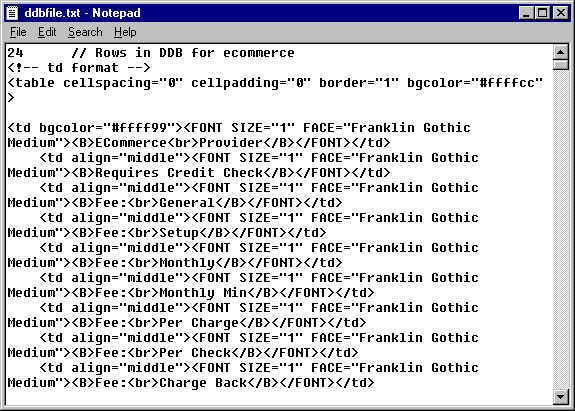
It is relatively easy to modify any existing HTML table so that it can serve as a DDB specification.
The Display Database will be scored -- but not be sorted -- if the fields in the Table Database are arranged vertically (in rows), regardless whether the "Sort by Score" and "Display Scores" checkboxes are checked in the Control Tool. In this case, the number of rows corresponds to the number of table fields. (The Table Database arranged this way is sorted if you choose to display it.)
View the HTML source if there are any problems in loading any of the ShowTheBest Interactive Table specifications. If ShowTheBest has any problems it will let you know via HTML comments.
Note: If ddbfile.txt, headerfile.txt and footerfile.txt exist in the browser subdirectory, then ShowTheBest will insert them in your Interactive Table Web Page. If they are not there then ShowTheBest will insert the DDB, header and footer from the (parent) Interactive Table Directory. If no DDB is found (but the control file specification says one should be there) then ShowTheBest does not display any DDB: it tells you something is wrong in the HTML comments when you View Source.
ShowTheBest supports alternate browser versions for headers, footers, and the Display Database. The alternate headers, footers, and the Display Database are placed in special browser version subdirectories. Here is an example of Interactive Directory "ecommerce" showing all 9 specification files and 2 subdirectories (for Netscape Navigator versions 4.7 and 5.0):

© 2002 Inductive Solutions, Inc. All Rights Reserved.