
|
ShowTheBest.Com
Interactive tables on your web pages
|
What Is ShowTheBest.Com
ShowTheBest.Com is a set of 7 integrated tools that are hosted in a web site's Common Gateway Interface (CGI) directory, that are used to build ShowTheBest interactive scoring tables. It is implemented in fast, efficient compiled C code (not interpreted Perl or PHP). Versions run on Windows and Unix (Linux) servers.
Directory Hierarchy
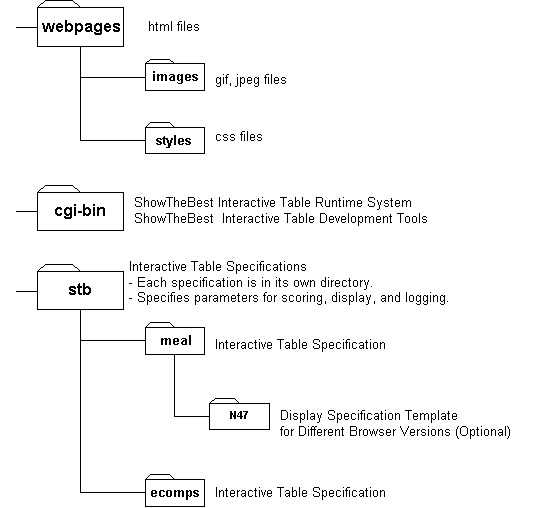
ShowTheBest.Com requires three directories:
- webpages
This directory contains your web-accessible webpages. (This directory can be renamed.)
- cgi-bin
This directory contains CGIs for the ShowTheBest.Com
Runtime (webmap-f.cgi), the ShowTheBest.Com Design Tool, Control Tool, Initializing Tool, and Label Tool.
(For extra security,
after you are finished building your ShowTheBest.Com Application, you should remove the ShowTheBest Development Tools from a
public directory or run the Development
Tools on a different server.)
- stb
This directory contains the ShowTheBest.Com Interactive Table Specification
Directories: a set of directories for each Interactive Table Application you
need. This Directory also contains subdirectories containing text files
for alternate browser versions.
Each Interactive Table Specification Directory can contain 9 text files that
ShowTheBest.Com uses to score and display. The Interactive Table Directory can also contain subdirectories containing text files for alternate
browser versions.
The text files contained in an Interactive Table Directory are:
- The Case Database Table file (Mandatory)
The file in this directory with the name tablefile.txt specifies the table used by ShowTheBest for
matching and scoring. This is your data that you
want ranked and prioritized.
The first line specifies the number
of rows and the number of columns. You need to use an editor or spreadsheet
to create this file. This file corresponds to the table
(that you pasted in the text area) of the
ShowTheBest.
This file can also be dynamically generated
by another program that ShowTheBest.Com calls (ie, a Perl program that calls a MySQL DBMS program).
- The Display Database file (Optional)
The file in this directory with the name ddbfile.txt
specifies the HTML for the Display Database (DDB). The DDB is a "display
alias" for the
Database Table: rows or columns in the DDB correspond to
rows or columns in the Table. The first line of this file
specifies the number of
rows in the DDB which corresponds to the number of rows in
the Database. You need to use an editor
to create this file.
All
matching, scoring,
and sorting is done on the Table but the display shows the
formats and contents of the DDB. If you do not create a DDB then
the Database Table will be displayed instead, according to the
default ShowTheBest styles and formats.
This file can also be dynamically generated
by another program that ShowTheBest.Com calls (ie, a Perl program that calls a MySQL DBMS program).
- The controls file (Use the the Control Tool to Automatically Build It )
The file in this directory with the name controlfile.txtspecifies
general parameters for the Interactive Table, including the appearance of the
Case Database Table and the Display Database; the appearance of scores, widgets,
and labels; and if needed, the name of an external calling program (together
with any arguments) that is used to
dynamically create the database tables.
You interactively
build the control file with the ShowTheBest
Control Tool. If you do not create
a control file then ShowTheBest will use a set of default controls.
- The label file (Optional)
The file in this directory with the name labelfile.txtspecifies the text for the labels and
headers used in the Interactive Table form. You interactively
build the label file with the ShowTheBest
Label Tool. If you do not create a label file then the default ShowTheBest labels will
be used.
- The header file (Optional)
The file in this directory with the name headerfile.txtspecifies the HTML header file you would like to
insert before the ShowTheBest Interactive Table. You need to
use an editor
to create this file.
If none is provided then ShowTheBest inserts its own default header.
- The footer file (Optional)
The file in this directory with the name footerfile.txtspecifies the HTML footer file you would like to
insert after the ShowTheBest Interactive Table.
You need to
use an editor
to create this file.
If none is provided then ShowTheBest inserts its own default footer.
- The Map file (Use the Design tool to Automatically Build It)
The file in this directory with the name mapfile.txtspecifies the weight and field maps for the
Interactive Table form. Weight maps are used to express importance criteria
and field maps are used to express value criteria. You interactively
build the map file with the ShowTheBest.Com Design Tool.
Note: Never manually modify the map file. Use the tool instead.
- The Init file (Optional)
The file in this directory with the name initfile.txtspecifies the initial values of the
weight and field widgets for the
Interactive Table Form. You interactively
build the init file with the ShowTheBest.Com
Initializing Tool.
Note: Do not manually modify the Init file. Use the
tool instead.
- The Log file(Optional)
The file in this directory with the name stbLogfile.txtcontains the values of all user
responses to your Interactive Table. It records the values of the weight and
field widgets after each user submission. Use this form to gather statistics
on your users.
Note that three of the above files -- the DDB and the header
and footer files -- can have several versions depending
on your user's browser type. These 3 specification files files are contained
in a browser version subdirectory. Here is an
example of Interactive Directory
"ecommerce" showing all 9 specification files and 2 subdirectories (for Netscape
Navigator versions 4.7 and 5.0):

Potential Problems?
If ShowTheBest.Com generates a web page that looks wrong, Just view the HTML source (use the browser command View Source.
ShowTheBest.Com documents what it is doing with HTML comments.
If there are any problems in
loading the ShowTheBest.Com files, it will let you know via HTML comments.
© 2002 Inductive Solutions, Inc.. All Rights Reserved.